Search CodeHorizon

Products

CSS Class HighlighterChrome extension · Live ShopGradeChrome extension + web app · Live SecureVaultAndroid app · Live Companion AIAndroid app · Live Speaker CleanerAndroid app · Live NickedAndroid game · Live CompassAndroid app · In testing TubeFocusChrome extension · Live KeeptakeChrome extension · Live TabClusterPast Chrome extension · Past project NotiloPast Chrome extension · Past project

Insights

Android now checks who built an app before it installs itAndroid WebMCP lets your website hand AI agents a proper set of toolsWeb and AI Your next customer might be an AI agent. Here is what it reads in your storeShopify Manifest V2 is gone. This is what a Chrome extension looks like nowChrome extensions Google sends fewer clicks now. Here is how a business website should adaptSearch

Pages

HomeThe studio ServicesWebsites, stores, extensions and apps Case studiesSelected work ProcessHow a project runs All productsThe complete collection InsightsPlatform changes, explained JournalEvery release, newest first Start a projectPlan it in a minute
move openEsc close

Companion AI

Android appLive

One good thought a day. That is it.

A calm quote app that delivers a daily dose of inspiration at the time you choose. It works offline and keeps your quotes on your phone. Free with ads, and one purchase removes them.

Platform
Android
Version
9.6
Updated
21 Oct 2026
Downloads
100+
Price
Free, optional one-time Remove ads
Role
Sole developer
Timeline
Mar to Jul 2025
Stack
KotlinJetpack ComposeRoomWorkManagerHiltRESTAdMobGoogle Play Billing

The problem

Why Companion AI exists

Most quote apps are loud: endless feeds and fifteen notifications a day. They end up being one more thing competing for your attention. Companion AI does the opposite. One good quote, at a time you pick, and it works even when you are offline.

Before

  • Endless feeds to scroll
  • Fifteen notifications a day
  • Nothing loads without a connection

With Companion AI

  • One good quote, when you choose
  • No feed, and no account
  • Works offline
The hardest part
A daily notification that arrives exactly once, at your time, through Doze, battery savers and reboots.

How it works

How you use it, step by step.

From opening the app to the thing you came for.

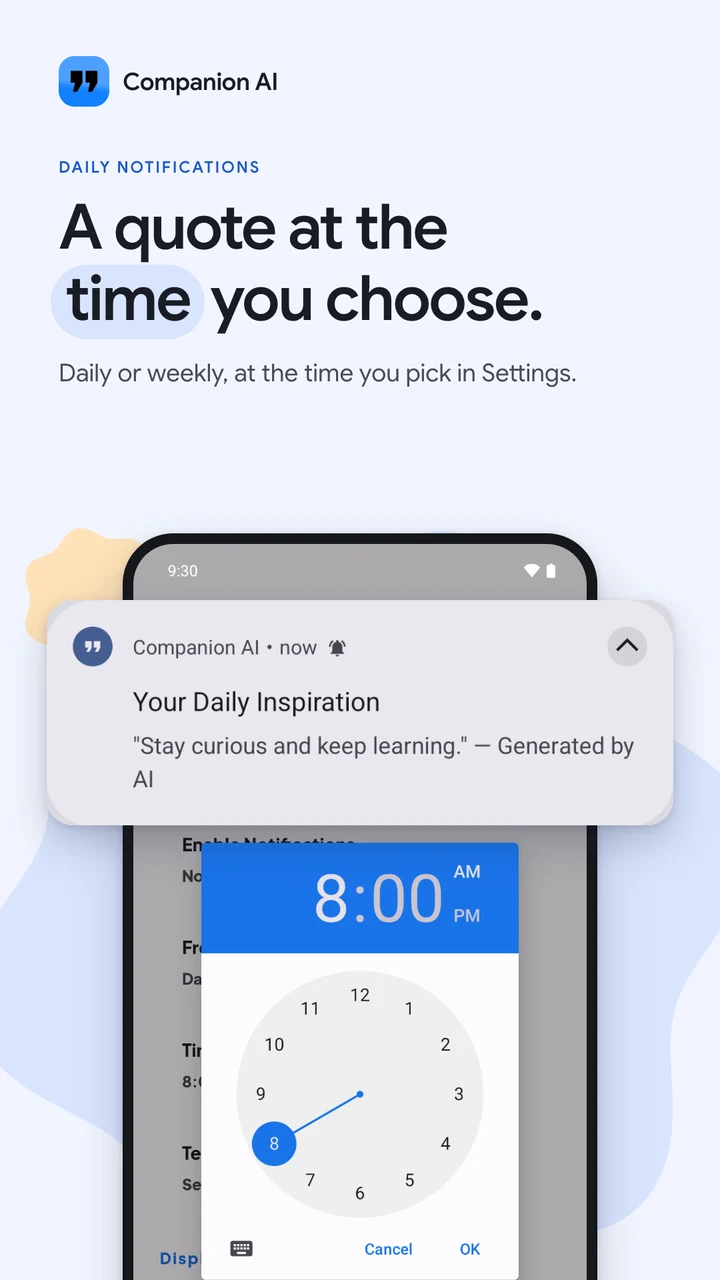
  1. Pick the time for your daily quote, then get it as a notification
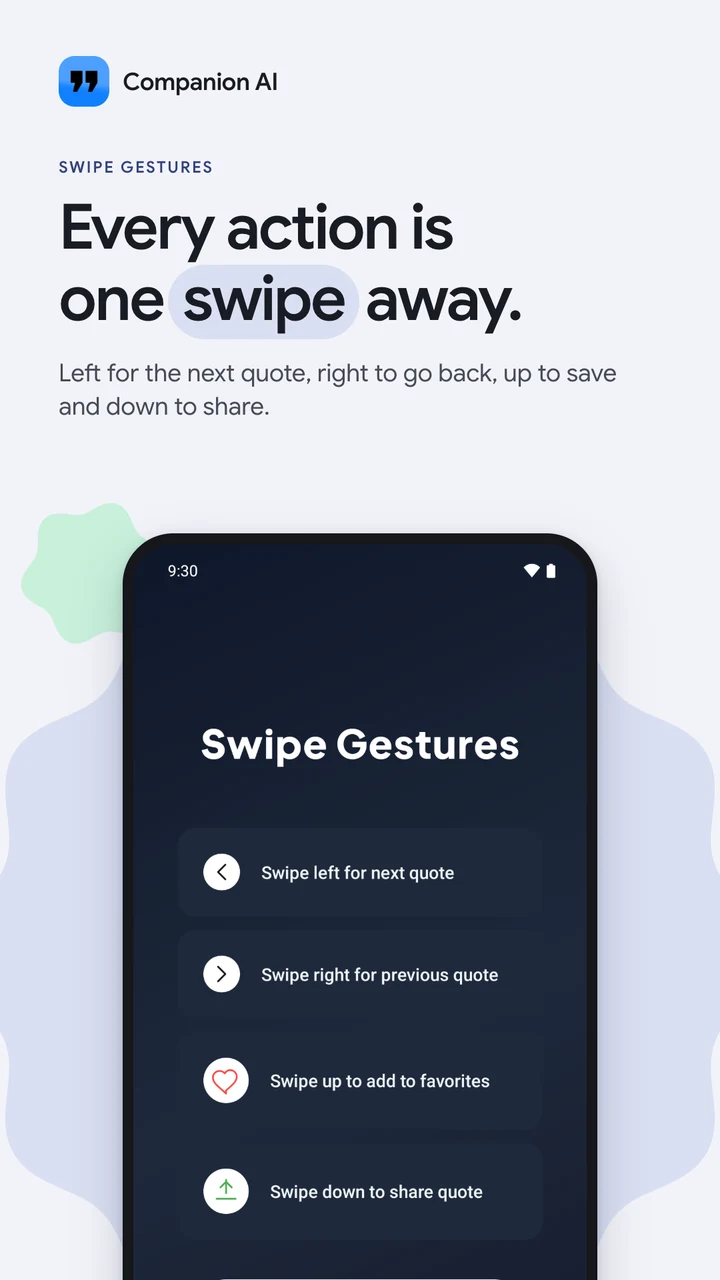
  2. Swipe left, right, up or down for the next quote, the last one, saving or sharing
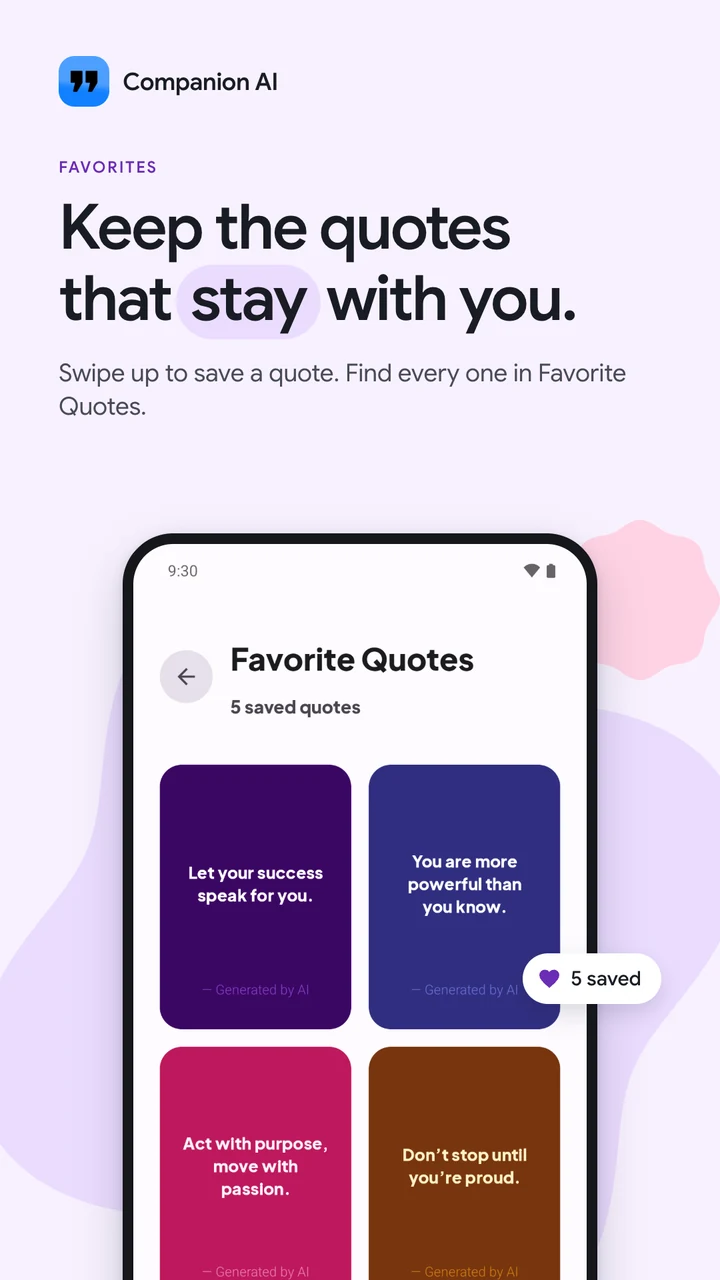
  3. Quotes you swiped up to save, in Favourite Quotes
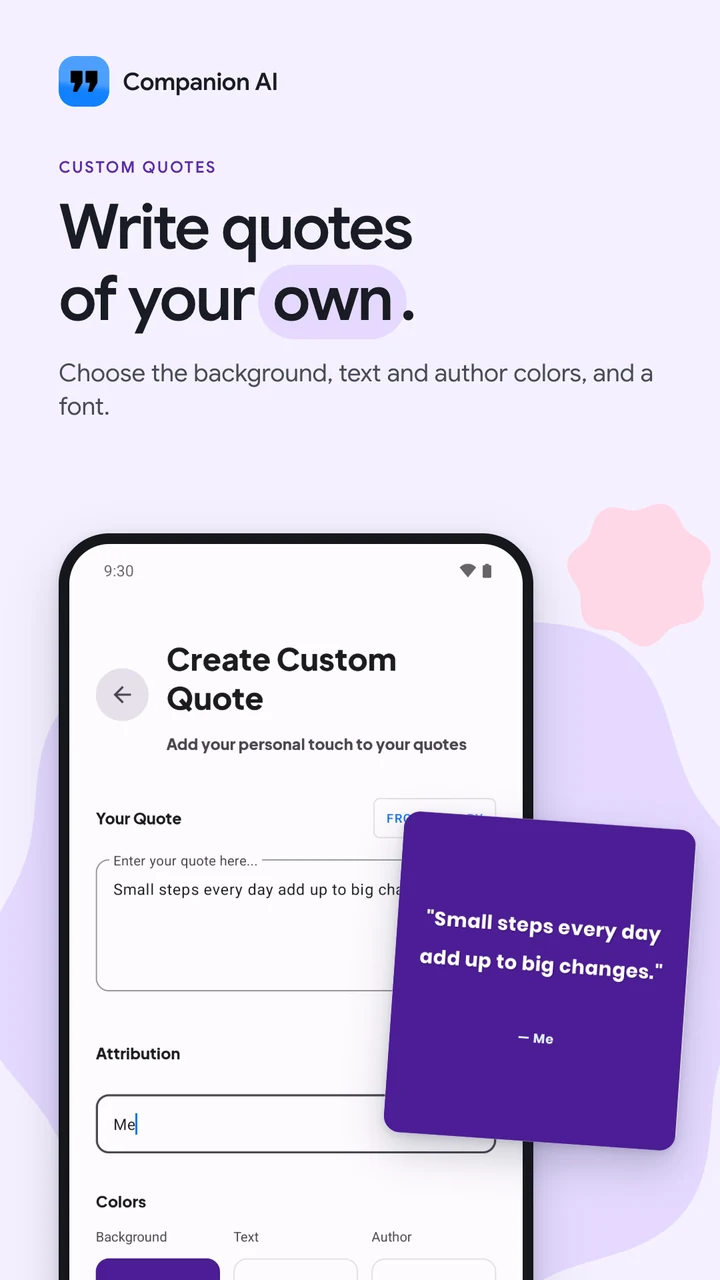
  4. Write your own quote and choose its colours and font
Pick the time for your daily quote, then get it as a notification
Swipe left, right, up or down for the next quote, the last one, saving or sharing
Quotes you swiped up to save, in Favourite Quotes
Write your own quote and choose its colours and font

Under the hood

How it is built.

An offline-first app that serves quotes from a Room database, so one is ready the moment you open it. WorkManager refreshes the cache in the background on Wi‑Fi, and a daily notification is rescheduled after every reboot.

  1. 01

    REST API

    A batch of quotes

    Quotes come in batches, so the app isn’t online for each one.

  2. 02

    Room

    Every quote served from the phone

    Every quote is served from Room on the phone, so it works offline, with no feed.

  3. 03

    WorkManager

    Tops up the cache, schedules the day’s quote

    Unique periodic work tops up the cache and schedules the day’s quote, its first run delayed to the time you chose.

  4. 04

    Notification

    Once, at the time you choose

    One notification a day, at your time, through Doze, battery savers and reboots.

01

Rebuilt on Hilt

The March 2026 update moved the app onto Hilt dependency injection, for stability.

02

Cards that answer your finger

Quote cards round their corners as you drag them, so every swipe feels physical.

03

Quotes as pictures

Any quote can be shared as an image card, drawn on the phone.

Kotlinutils/NotificationScheduler.ktlines 50 to 81
private fun scheduleDailyNotifications(replaceExisting: Boolean) {
    val hour = preferencesHelper.getNotificationHour()
    val minute = preferencesHelper.getNotificationMinute()

    val currentTime = Calendar.getInstance()
    val scheduledTime = Calendar.getInstance().apply {
        set(Calendar.HOUR_OF_DAY, hour)
        set(Calendar.MINUTE, minute)
        set(Calendar.SECOND, 0)
        set(Calendar.MILLISECOND, 0)
    }

    // If the scheduled time has passed today, schedule for tomorrow
    if (scheduledTime.timeInMillis <= currentTime.timeInMillis) {
        scheduledTime.add(Calendar.DAY_OF_MONTH, 1)
    }

    val delay = scheduledTime.timeInMillis - currentTime.timeInMillis

    Log.d(TAG, "Scheduling daily notification for ${scheduledTime.time} (delay: ${delay}ms)")

    val dailyWorkRequest = PeriodicWorkRequestBuilder<DailyQuoteWorker>(1, TimeUnit.DAYS)
        .setInitialDelay(delay, TimeUnit.MILLISECONDS)
        .addTag(DAILY_WORK_NAME)
        .build()

    workManager.enqueueUniquePeriodicWork(
        DAILY_WORK_NAME,
        if (replaceExisting) ExistingPeriodicWorkPolicy.CANCEL_AND_REENQUEUE else ExistingPeriodicWorkPolicy.KEEP,
        dailyWorkRequest
    )
}
From the sourceOnce a day, at your timeThe daily quote is unique periodic work, its first run delayed to the next time you chose. Changing the time replaces it, so there’s never a second one.

Decisions

The calls I made, and what they cost.

Each decision lists the reason for it and what it gave up.

  1. 01

    WorkManager instead of AlarmManager

    Why

    It handles Doze, battery optimisation and reboots on its own.

    Trade-off

    Periodic work runs at most every 15 minutes, which is fine for a once-a-day app.

  2. 02

    Fetch in batches, always serve from Room

    Why

    The app should never show a spinner for a quote.

    Trade-off

    A first launch with no internet has nothing to show yet.

A bug worth telling

The quote that came four times

What happened
After a reboot, the daily notification fired three or four times.
Why
The boot receiver queued a new periodic job on every boot without checking for the one already there, so each reboot stacked another.
The fix
Queue it with ExistingPeriodicWorkPolicy.KEEP: if the job is already there, it’s left alone.

What I tried first

  • AlarmManagerThe first version used it. On the emulator it was perfect; on a Samsung with aggressive battery optimisation, alarms fired hours late or not at all.
  • Fetching on every openOpened offline in the morning, it showed a spinner where the quote should be. Offline-first was obvious after that.

What I learned

  • Room migrations are the most common crash after an update. Test them before release.
  • Timing matters. A quote at 6:58 vs 7:02 decides whether someone sees it before or after their morning routine.

Screens

What it looks like.

01 / 06
01One good quote a day, from 450 quotes in 36 colour themes
02Swipe left, right, up or down for the next quote, the last one, saving or sharing
03Quotes you swiped up to save, in Favourite Quotes
04Pick the time for your daily quote, then get it as a notification
05Write your own quote and choose its colours and font
06Every quote arrives in its own colour theme

Features

What you get.

01

30+ colour themes

Beautiful cards with smooth, minimal animations and light and dark themes.

02

Offline first

Quotes are stored on the device, so there is no waiting and no internet needed.

03

Daily notifications

One quote at the time you choose, scheduled to survive restarts.

04

Custom quotes

Write your own and organise them with tags.

05

Gesture controls

Every action is one swipe away.

06

One-time Remove ads

One purchase through Google Play turns every ad off. No subscription.

Your data

Your quotes, favourites and settings stay on your phone, with no account. Ads come from Google AdMob, which asks for consent where the law requires it, and a one-time Remove ads purchase turns them off.

Questions

Good questions.

Something else? Ask me directly.

Does it need an internet connection?

No. Quotes are stored on your device, so they load instantly and work offline.

How often will it notify me?

Once, at the time you choose. You can have your quote daily or weekly, and the schedule survives restarts.

Are there ads?

Yes, since October 2026. Companion AI is free and supported by ads from Google AdMob. A one-time Remove ads purchase turns them all off, and a short optional video gives you some ad-free time.

Can I add my own quotes?

Yes. Write your own quotes, organise them with tags and keep them alongside your saved favourites.

Milestones

From the first line to today.

  1. 24 Oct 2025

    On Google Play

    One quote a day at the time you choose, favourites, your own quotes, and any quote shared as an image.

  2. 19 Mar 2026

    Cards that bend

    Quote cards round their corners as you drag them, with new icons, a redesigned menu, and the app rebuilt on Hilt.

  3. 21 Oct 2026

    9.6, free with ads

    AdMob ads, a one-time Remove ads purchase and rewarded ad-free time, set in Google Sans and targeting Android 16.

  1. Updatev9.6

    Companion AI is now free with ads, and one purchase removes them

    The quote app now shows ads, and a one-time purchase through Google Play turns them all off.

    • Ads are new: banners, an occasional full-screen ad between quotes, and one ad card in your lists.
    • Remove ads is a single purchase through Google Play, or watch a short video for some ad-free time.
    • The whole app is now set in Google Sans, and it targets Android 16.
    • The create button no longer covers your last custom quote.
  2. Update

    Companion AI's quote cards now bend as you swipe

    A softer, calmer look, with cards that respond to your finger.

    • Quote cards round their corners as you drag them, so every swipe feels physical.
    • New minimal icons and a redesigned side menu.
    • Rebuilt under the hood for better stability.
  3. Launch

    Companion AI arrives on Google Play

    One thoughtful quote a day, at the time you choose. No feed, no noise.

    • Save your favourites and share any quote as a good-looking image.
    • Keep your own quotes alongside the daily ones.
    • Swipe through with smooth, gentle animations.

For businesses

Like how Companion AI turned out? I can build yours.

Websites, Shopify stores, Chrome extensions and Android apps, designed and engineered with the same care as my own products.
Booking new projects

Tell me what you’re building.

I read every message myself and reply within a day or two with honest next steps.

  1. 01You share the ideaA few lines is plenty. Links to anything similar help.
  2. 02We talk it throughOne short conversation by email or a quick call.
  3. 03You get a clear planScope, timing and a price that fits, before any work starts.
Just say helloFour fields, that is all

Your details come straight to my inbox and are only used to reply. Nothing is stored on this site or shared.

Project plannerTakes about a minute
01What do you need?Pick any that fit. Skip it for a quick hello.
02Budget
03Timeline
04Tell me about it

Your details come straight to my inbox and are only used to reply. Nothing is stored on this site or shared.